
WordPress has been a go-to content management system (CMS) for many years now, and powers around half of websites on the internet.
While we’ve built countless WordPress sites for small business clients and will continue to create fast custom sites, we’re considering alternatives like Grav CMS for a number of reasons.
Why Switch From WordPress?
Small Sites Rarely Get Edited; No Point Having a CMS
For small websites that feature minimal content or remain relatively static, the overhead of a full-fledged Content Management System (CMS) like WordPress is often unnecessary. A CMS is equipped with numerous features and tools designed for managing large volumes of content, which can overwhelm users when these capabilities aren’t needed. Instead, static HTML sites can be simpler to create, maintain, and host, without the complexities of a database backend.
This simplicity minimises resource usage and hosting costs and boosts performance. It also eliminates the ongoing maintenance overhead that a CMS like WordPress requires, with a quick update process when necessary.
Slow, Needs Performance Tuning
WordPress can frequently be slow out of the box, primarily due to its reliance on heavy themes and numerous plugins that introduce significant database overhead. Frequent database interactions can slow down load times, especially if the database isn’t optimised. Achieving decent performance often necessitates the implementation of various performance-enhancing techniques, including caching plugins, image optimisation, and script minimisation. These processes can be time-consuming and require a good understanding of the system.
Additionally, the quality of the hosting environment plays a huge role in performance, with inadequate hosting potentially causing speed issues and requiring more expensive hosting plans to achieve acceptable performance levels.
Gutenberg and Full Site Editing (FSE) Are Horrible and We Disable Them on Sites We Build
The introduction of Gutenberg and the Full Site Editing (FSE) functionality in WordPress has led to widespread dissatisfaction among many developers and content creators. We’ve found users often find Gutenberg’s block-based editing interface nightmarish compared to traditional editing methods, resulting in frustration when formatting and structuring content. Furthermore FSE can limit the precise design control that developers prefer, complicating the maintenance of consistent designs across different pages.
Due to these shortcomings, many developers choose to disable these features altogether, opting for classic editing methods that allow for easier customisation and greater creative control.
Automattic Now Cramming AI In Everywhere
Automattic has increasingly incorporated AI features into their products, which has sparked a mixed response from the user community. While these features may appear innovative, their introduction often clutters the user interface with unnecessary tools that many users do not want or need, detracting from the overall workflow and user experience. This focus on AI can divert attention from refining existing functionalities or addressing current user pain points, as resources are redirected toward implementing these new technologies. Furthermore, heavy reliance on AI risks diminishing user engagement in the content creation process, creating a potential dependency on automated suggestions rather than active content development.
Without Regular Updates, High Risk of Being Hacked
Security concerns are a significant issue in using WordPress, especially as failing to keep the system updated exposes users to substantial risks. WordPress’s popularity makes it an appealing target for hackers, and new vulnerabilities are continually being identified, needing regular updates to keep sites secure. Additionally, third-party plugins can introduce their own security weaknesses if not regularly updated, leaving users vulnerable if they rely on outdated extensions. Maintaining security through consistent updates demands constant care from site owners, as neglecting this responsibility can lead to hacking incidents resulting in data loss or even site defacement. The costs associated with recovering from a breach such as hiring security experts to fix a broken site, can significantly increase the total cost of ownership over time.
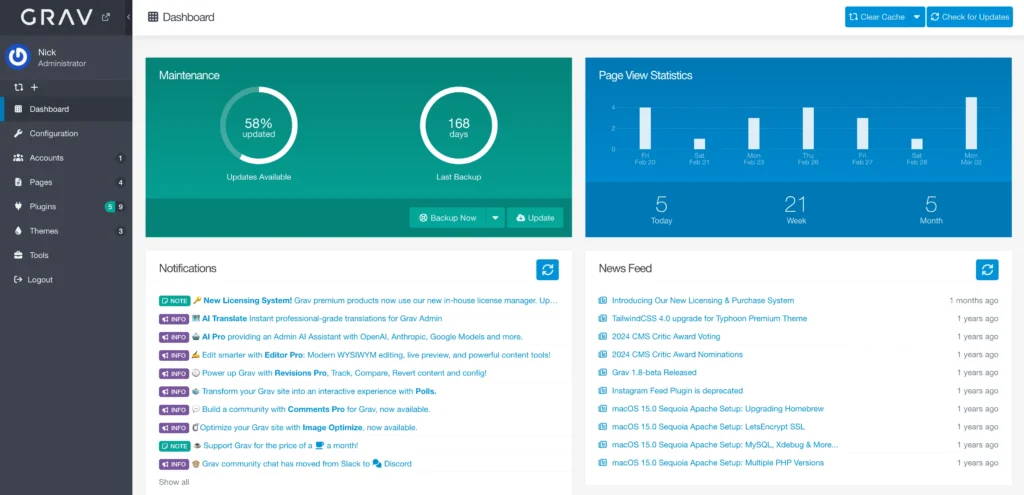
Grav CMS v1.7 optional admin panel
Content Editing
Grav CMS
Grav CMS relies on a simple markdown system by default, which provides a clean interface for editing content by just updating text files. An admin panel and WYSIWYG-ish Markdown editor is also available however, which simplifies content editing for non-technical users.
WordPress
WordPress features a clunky visual editor utilising blocks (Gutenberg), which makes it (allegedly) user-friendly for those who prefer a WYSIWYG (What You See Is What You Get) format. It offers extensive plugins that enhance editing capabilities. Gutenberg has a learning curve however, and it’s easy to make a mess of the content.
Many WordPress sites *also* have another editor like DIVI or Elementor installed, further confusing users and slowing the site down.
Performance
Grav CMS
Grav is exceptionally fast due to its flat-file architecture, which eliminates the need for database queries. This results in quicker page loading times straight out of the box, making it an attractive option for performance-focused projects. Using fewer server resources also means less power usage, making sustainable web design more achievable.
WordPress
WordPress can be optimised for performance, but it typically involves more overhead due to database interactions. The performance can be significantly enhanced with caching plugins, but it may still lag behind Grav in raw speed. Compared to other PHP applications, stock WordPress performance is terrible and each plugin added generally makes it worse.
SQlite support is coming however and this could speed up WordPress sites by reducing database access time.
Cost
Grav CMS
Grav is freemium and open-source, and it has relatively low hosting costs. It can be hosted on static hosting services, which often provide better performance at a lower price point. No developer support is required for software updates.
The free version works fine and the ‘premium’ package is there if you want the fancy editor, a premium theme and/or want to support the 3 person development team.
WordPress
WordPress itself is free, but the overall cost can vary significantly based on hosting choices. Managed WordPress hosting (WP Engine etc) can be costly, and premium themes or plugins licences can add up quickly. Many plugin companies are gouging users with monthly or yearly fees for basic functionality.
For non-technical users, a WordPress maintenance service is often required, with weekly or monthly updates required to stay safe. If the content isn’t updated often, a monthly maintenance cost is not a good use of budget.
Summary
Overall, the choice between Grav CMS and WordPress largely depends on your project requirements, technical expertise, and long-term goals. Grav 2 has just been released with a sexy new control panel and a slew of other massive updates.
- Grav CMS excels in speed and simplicity and doesn’t need constant software updates to avoid getting hacked.
- WordPress offers a massive plugin ecosystem to help develop more complex sites, but requires constant maintenance and learning or disabling the included clutter.
Need help choosing? Contact us today to discuss your project.